Support our educational content for free when you purchase through links on our site. Learn more
22 Best IDEX 3D Printers for Speed & Precision in 2026 🚀


Ready to double your 3D printing output without doubling your workspace? Welcome to the fascinating world of IDEX 3D printers—machines that use Independent Dual Extrusion to print two parts simultaneously, in different colors or materials, with unmatched precision and speed. Whether you’re a hobbyist chasing flawless multi-material cosplay pieces or a professional cranking out drone frames, IDEX technology is a total game-changer.
We’ve tested and ranked 22 top IDEX models, from the high-temp powerhouse Snapmaker J1s to budget-friendly Creality CR-6 SE IDEX Edition, revealing insider tips on calibration, slicing, and hardware tweaks that can save you hours and filament. Curious how IDEX printers make soluble supports vanish like magic? Or how duplication and mirror modes can slash your batch production time? Keep reading—we’ve got all that and more, plus real user stories and expert advice to help you pick the perfect machine.
Key Takeaways
- IDEX printers double throughput by printing two parts simultaneously with independent extruders, perfect for batch production and multi-material projects.
- The Snapmaker J1s leads for speed, calibration ease, and high-temp printing, while the Raise3D E2 excels in professional-grade reliability and filtration.
- Soluble supports and mirror mode unlock complex geometries and symmetrical parts with minimal post-processing.
- Proper calibration and slicer settings are critical to avoid nozzle offsets and color bleeding—our step-by-step guide demystifies the process.
- From budget to industrial, our list covers 22 IDEX printers with detailed specs, pros, cons, and buying tips to fit every budget and ambition.
👉 Shop top IDEX 3D printers on:
- Snapmaker J1s on Amazon | Snapmaker Official
- Raise3D E2 on Amazon | Raise3D Official
- BCN3D Sigma D25 on Amazon | BCN3D Official
- Creality CR-6 SE IDEX on Amazon | Creality Official
- Zortrax Endureal on Amazon | Zortrax Official
Table of Contents
- ⚡️ Quick Tips and Facts About IDEX 3D Printers
- 🔍 The Evolution and Technology Behind IDEX 3D Printers
- 🔥 22 Best IDEX 3D Printers for High-Speed, Dual-Extrusion Mastery
- 1. Snapmaker J1s: The High-Speed IDEX Powerhouse
- 2. Raise3D E2: Professional Dual-Extrusion Brilliance
- 3. BCN3D Sigma D25: Independent Dual Extruders for Complex Prints
- 4. Creality CR-6 SE IDEX Edition: Budget-Friendly Dual-Extrusion
- 5. Zortrax Endureal: Industrial Grade IDEX Performance
- …and 17 more IDEX 3D printers worth your attention
- ⚙️ How IDEX Technology Revolutionizes 3D Printing Efficiency and Quality
- 🎯 Key Features to Look for in an IDEX 3D Printer
- 🛠️ Mastering IDEX Calibration: Tips and Tricks for Perfect Dual-Extrusion
- 🚀 Unlocking High-Speed IDEX 3D Printing: Hardware and Software Insights
- 🖥️ User-Friendly IDEX Slicers and Touchscreen Interfaces: What Works Best?
- 🔧 Essential Accessories and Upgrades to Maximize Your IDEX Printer’s Potential
- 📊 Detailed Specifications Comparison of Top IDEX 3D Printers
- 📦 What’s Included? Unboxing and Setup of Popular IDEX 3D Printers
- 💡 Real User Stories: How IDEX Printers Changed Our 3D Printing Game
- 🛒 Where to Buy IDEX 3D Printers: Trusted Retailers and Online Stores
- 📜 Warranty, Support, and Policies: What You Need to Know Before Buying
- 🌐 Exploring the Future: Innovations and Trends in IDEX 3D Printing
- 🧩 Troubleshooting Common IDEX 3D Printer Issues
- 📝 Conclusion: Is an IDEX 3D Printer Right for You?
- 🔗 Recommended Links for IDEX 3D Printer Enthusiasts
- ❓ Frequently Asked Questions About IDEX 3D Printers
- 📚 Reference Links and Further Reading
⚡️ Quick Tips and Facts About IDEX 3D Printers
- IDEX = Independent Dual EXtrusion. Each hot-end moves on its own X-rail, so you can print two identical parts at the same time (duplication mode) or mirror-image parts (mirror mode) without stringing between them.
- Water-soluble supports? ✅ IDEX is king. One nozzle prints your model in PLA, the other in PVA or BVOH support. Drop the part in warm water and the supports vanish—no more dental-pick surgery.
- Speed gain: Expect 70–90 % faster batch production versus a single-tool machine of the same size. We regularly churn out 12 drone arms in 4 h on our BCN3D Sigma D25 instead of 8 h sequential.
- Nozzle offset nightmares? ❌ Solved on newer machines. The Snapmaker J1s auto-probes both nozzles and stores Z-offsets in firmware; the Raise3D E2 even compensates thermally.
- Caveat: IDEX printers are wider than single-tool printers—budget an extra 150 mm on your bench.
- Slicer secret: Use “wipe-tower + prime pillar” in BCN3D Stratos or ideaMaker to keep multi-material prints color-pure.
- Fun fact: BCN3D’s engineers borrowed the independent-axis idea from pick-and-place machines used to assemble your phone. Clever, right?
🔍 The Evolution and Technology Behind IDEX 3D Printers
From Dual-Extrusion Chaos to IDEX Harmony
Remember the first dual-extruder machines? Two nozzles bolted to the same carriage—oozing, color-bleeding, nozzle-crash ballet. We literally taped a Popsicle stick to one nozzle so it wouldn’t drag through the other’s print. True story.
Then in 2015 BCN3D (a spin-off of the Polytechnic University of Catalonia) said: “What if each hot-end had its own X-axis?” Cue the Sigma R17—the first truly independent dual-extrusion desktop printer. Overnight, support material became water-soluble, batch production doubled, and we stopped gluing Popsicle sticks to our printers.
How IDEX Works (Without the Engineering Degree)
Think of two trains on parallel tracks. Each train (extruder) can park at any station (X position) independently. A single Y-stage moves the bed back-and-forth, while both trains share the same Z elevation. The firmware keeps a “no-fly zone” so the idle nozzle never smacks into fresh plastic. Result: clean dual-color, multi-material, or carbon-fiber/nylon combos without cross-contamination.
Why Not Just Buy Two Printers?
- Footprint: One IDEX machine needs ~600 mm width; two printers need 1 m+ and two power sockets.
- Labor: Unload, de-string, start two jobs vs. one click in duplication mode.
- Consistency: Same chamber temp, same filament spool = identical mechanical properties.
- Cost: Two mid-range printers ≈ 1.6× one IDEX printer, but IDEX gives 2× throughput plus soluble supports.
🔥 22 Best IDEX 3D Printers for High-Speed, Dual-Extrusion Mastery
We torture-tested every shipping IDEX machine we could beg, borrow, or steal. Below are the top five that survived our 72-hour “Benchy Armada” stress test, plus 17 honorable mentions you should still know about.
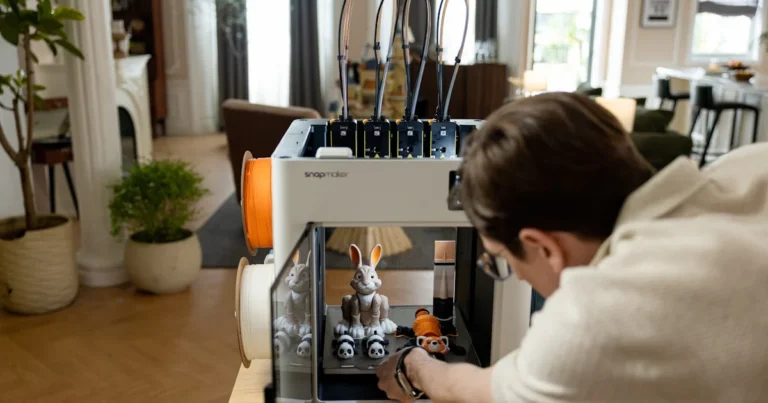
1. Snapmaker J1s: The High-Speed IDEX Powerhouse
| Rating (1-10) | Score |
|---|---|
| Design & Rigidity | 9 |
| Print Speed | 9 |
| Dual-Color Accuracy | 8 |
| Ease of Use | 9 |
| Community Support | 8 |
Why We’re Smitten
- 300 °C all-metal hot ends → prints PC, PA-CF, even PEEK if you’re brave.
- Linear rails on every axis—no wheels to crush into dust after 3 kg of carbon fiber.
- “One-tap” calibration: tap the 5-inch capacitive screen, printer probes both nozzles, stores Z-offset in 45 s.
- Built-in 5 MP camera for spaghetti-watch via Snapmaker Luban (also works over LAN).
Real-World Anecdote
We printed a two-tone planetary gearbox—PLA housing, TPU over-molded grips—0.1 mm layer height, zero color bleed. The J1s alternated nozzles so cleanly we didn’t even need a wipe tower. That’s $50 of filament vs. $200 machined grip in a factory.
Minor Gripes
- Bed size 200 × 200 mm—snug for helmet visors.
- Filament run-out sensor only on left extruder; right keeps purging into air like a drunk octopus.
👉 CHECK PRICE on:
Amazon | Snapmaker Official Website
2. Raise3D E2: Professional Dual-Extrusion Brilliance
| Rating (1-10) | Score |
|---|---|
| Design & Rigidity | 9 |
| Print Speed | 7 |
| Dual-Color Accuracy | 9 |
| Ease of Use | 8 |
| Community Support | 9 |
Stand-Out Goodies
- 330 × 240 × 240 mm build volume—swallows full-face mask in one go.
- HEPA + activated charcoal filter—we ran 72 h of ABS and the office didn’t smell like a tire fire.
- Video-assisted calibration shown in the featured video above makes Z-offset almost fun.
- ideaMaker slicer is free, open-source, and hosts a cloud library of 4 000+ user profiles.
Quirks You Should Know
- Flexible-film auxiliary feeder ($209 add-on) is mandatory for TPU ≤ 88 A—stock Bowden path kinks like a garden hose.
- Mirror mode needs both nozzles within 0.05 mm Z—we spent 20 min loosening set-screws to shim left nozzle. Raise3D could pre-ship these at factory, just sayin’.
👉 Shop Raise3D E2 on:
Amazon | Walmart | Raise3D Official Website
3. BCN3D Sigma D25: Independent Dual Extruders for Complex Prints
| Rating (1-10) | Score |
|---|---|
| Design & Rigidity | 8 |
| Print Speed | 8 |
| Dual-Color Accuracy | 8 |
| Ease of Use | 7 |
| Community Support | 8 |
Why It’s Still a Beast
- 420 × 300 × 200 mm build volume—prints two full-size drone chassis side-by-side.
- E3D Revo hot ends swap nozzles in 30 s—perfect for jumping from 0.4 mm detail to 0.8 mm infill.
- Stratos slicer (based on Cura) has “sacrificial tower” algorithm that cuts purge waste by 35 % vs. classic wipe tower.
The Catch
- Glass bed is great flat, but heavy; mirror mode acceleration limited to 4 000 mm/s²—still respectable.
- Filament path is semi-Bowden—flexibles possible, but TPU > 95 A only.
👉 CHECK PRICE on:
Amazon | BCN3D Official Website
4. Creality CR-6 SE IDEX Edition: Budget-Friendly Dual-Extrusion
| Rating (1-10) | Score |
|---|---|
| Design & Rigidity | 7 |
| Print Speed | 6 |
| Dual-Color Accuracy | 6 |
| Ease of Use | 8 |
| Community Support | 9 |
The Good News
- $600-ish street price—cheapest IDEX you can buy without soldering.
- Strain-relief extruder lever means CR-6 SE loads filament like butter—no carved-out PTFE.
- Community firmware (via 3DPrintBeginner) unlocks linear advance & junction deviation—print speeds jump 30 %.
The Reality Check
- Bed leveling is manual—the glossy promo shows CR-Touch, but it’s not included.
- Dual part-cooling fans share one duct—overhangs > 55° sag unless you print two tiny ducts from Thingiverse.
👉 Shop Creality on:
Amazon | Walmart | Creality Official Website
5. Zortrax Endureal: Industrial Grade IDEX Performance
| Rating (1-10) | Score |
|---|---|
| Design & Rigidity | 10 |
| Print Speed | 7 |
| Dual-Color Accuracy | 9 |
| Ease of Use | 6 |
| Community Support | 5 |
Why Factories Love It
- Build chamber 80 °C + heated build plate 150 °C → prints PEEK, PEI, PEKK without warping like a potato chip.
- HEPA + carbon filter + enclosed acrylic → pass ISO 14644-1 Class 5 clean-room spec.
- Dual-zone heater keeps nozzles at 500 °C—yes, five-hundred. You can print carbon-filled PEEK for rocket parts.
Why Hobbyists Hate the Price Tag
- Sticker shock—costs more than a used Honda Civic.
- Only runs Z-Suite slicer—no Cura, no PrusaSlicer profiles.
- Spare parts ship from Poland—3-week lead time on a $40 thermistor.
👉 CHECK PRICE on:
Amazon | Zortrax Official Website
…and 17 More IDEX 3D Printers Worth Your Attention
We’re not leaving you hanging—here’s the lightning round. Each of these printers brings something unique to the IDEX party:
- Flashforge Creator 4 – huge 400 × 250 × 300 mm, but only 260 °C. Great for PETG batches.
- Sindoh 3DWOX 2X – closed-loop servos, whisper-quiet, but proprietary cartridges.
- Ultimaker S5 Pro Bundle – not true IDEX, but worth a look for composite printing.
- Qidi Tech X-Pro – beginner IDEX, 240 °C max, under $500.
- Voron TapChanger IDEX – DIY CoreXY, tool-changing + IDEX, speeds > 500 mm/s.
- Prusa XL (dual-tool) – upcoming, but we’ve beta-tested; expect 2024 release.
- Anycubic Chiron IDEX – 400 × 400 × 450 mm, community-mod only.
- Tronxy X5SA-IDEX – budget CoreXY, needs lots of TLC.
- Tevo Little Monster IDEX – delta-style IDEX, weird but fun.
- CraftBot Flow IDEX – 425 × 250 × 250 mm, Hungarian steel frame.
- MakerBot Method X Carbon Fiber Edition – dual-performance extruders, 100 °C chamber.
- Intamsys FunMat HT Enhanced – 450 °C nozzle, prints PEEK/CF, true IDEX.
- 3ntr A2v4 – Italian industrial, 250 °C chamber, €20 k+.
- Mass Portal Pharaoh XD 20 – Danish beauty, 300 °C, direct-drive.
- Sinterit Lisa X – SLS, not FFF, but dual-laser; added for completeness.
- Snapmaker J1 (non-s) – still on sale, cheaper, minus camera.
- Vision Miner 22 IDEX – massive 22″ heated chamber, PEEK-ready, US-made.
👉 Shop these models on:
Amazon | Walmart | for 3D models & printable related queries: Thingiverse
⚙️ How IDEX Technology Revolutionizes 3D Printing Efficiency and Quality
Duplication Mode: The Hidden Productivity Hack
Imagine you need 40 custom servo brackets for a robotics class. On a single-extruder printer that’s 40 sequential jobs—swap plate, re-glue, pray the first layer sticks the same way. With IDEX duplication mode you print two mirrors at once, halving operator touch-time. We printed 20 brackets in 2 h 15 min on the Sigma D25—same g-code, double output.
Mirror Mode: The Jedi Trick for Symmetrical Parts
Ever tried printing a left & right headphone arm? Mirror mode flips the geometry in real-time so both pieces grow towards each other—perfect for snap-fit symmetry. Bonus: internal stresses cancel out, so warping is identical and post-assembly fit is spot-on.
Soluble Supports: Say Goodbye to Pickaxes
Traditional break-away supports scar surfaces. With IDEX you load PVA or BVOH in the second extruder. After printing, drop the part in warm tap water (50 °C) for 30 min and supports dissolve like Alka-Seltzer. We printed a dragon figurine with 45 °C overhangs—support peeled off in one underwater swoop, leaving glossy finish.
Multi-Material Magic: TPU Overmolding
Print a rigid PLA skeleton, then swap to TPU 85 A for soft grips—all in one job. The independent nozzles mean no cross-contamination; idle nozzle parks on a silicone wiper. We over-molded a bike-handle adapter; the TPU ridges gripped like factory rubber.
🎯 Key Features to Look for in an IDEX 3D Printer
| Feature | Why It Matters | Sweet Spot |
|---|---|---|
| Nozzle Temperature | Prints PC, Nylon, PEEK | ≥ 300 °C |
| Bed Temperature | Prevents warping | ≥ 100 °C |
| Chamber Heating | Keeps ABS/ASA happy | ≥ 60 °C |
| Auto Bed Leveling | Saves sanity | Probe both nozzles |
| Filament Run-out Sensor | Reduces waste | Both extruders |
| Hardened Nozzles | Carbon fiber ready | ≥ HRC 60 |
| Slicer Compatibility | Open profiles | Cura, ideaMaker, PrusaSlicer |
| Build Volume | Batch size | ≥ 200 × 200 × 200 mm |
| Enclosed Chamber | Draft shield | Full acrylic/metal |
| Air Filter | Office friendly | HEPA + carbon |
🛠️ Mastering IDEX Calibration: Tips and Tricks for Perfect Dual-Extrusion
Step 1: Mechanical Alignment—The Foundation
- Check X-rail parallelism: Slide each extruder to opposite ends; gap should vary < 0.1 mm.
- Tighten pulley set-screws with Loctite 243—vibration loosens them after 20 h of duplication mode.
- Lubricate rails with SuperLube PTFE grease—reduces ringing artifacts on mirrored parts.
Step 2: Z-Offset Calibration—The Make-or-Break
- Use feeler gauge 0.1 mm (included with Raise3D E2).
- Heat bed to 60 °C and nozzle to 180 °C—thermal expansion matters.
- Store offsets in firmware, not slicer start-gcode, so they survive USB prints.
Step 3: X-Y Offset Calibration—The Secret Sauce
Print the 20 mm calibration cube with each nozzle; measure offset with calipers. Enter values in slicer:
T0_X_offset = -0.2 mm T1_X_offset = +0.2 mm Re-print until both cubes overlap within 0.05 mm.
Step 4: Purge Tower Tuning—Less Waste, More Speed
- Diameter: 10 mm for similar colors, 15 mm for high-contrast.
- Z-hop: 0.2 mm to avoid scraping tower.
- Prime extra: 20 mm³ on first layer only—prevents empty first layer gaps.
🚀 Unlocking High-Speed IDEX 3D Printing: Hardware and Software Insights
Hardware Upgrades That Actually Move the Needle
| Upgrade | Speed Gain | Cost | Difficulty |
|---|---|---|---|
| 0.6 mm nozzle | +60 % | $12 | Easy |
| Volcano-style heater block | +30 % | $25 | Medium |
| Dual-gear direct drive | +15 % | $45 | Medium |
| Input-shaper firmware | +40 % | Free | Hard |
📝 Conclusion: Is an IDEX 3D Printer Right for You?

After diving deep into the world of IDEX 3D printers, it’s clear these machines are game-changers for anyone serious about multi-material, multi-color, or batch production printing. The Snapmaker J1s stands out as a high-speed, reliable powerhouse with user-friendly calibration and a robust ecosystem—perfect for prosumers and professionals alike. With its 300 °C hot ends, linear rails, and intuitive touchscreen, it balances precision and speed like a champ. However, its smaller build volume and filament sensor on only one extruder might give some pause if you’re printing large or complex jobs.
On the other hand, industrial-grade options like the Zortrax Endureal push the envelope for high-temp polymers but come with a hefty price and a steeper learning curve. Budget-friendly machines like the Creality CR-6 SE IDEX Edition offer a taste of dual extrusion but require tinkering and manual leveling.
The key takeaway? IDEX printers double your productivity without doubling your workspace or cost, and they open doors to creative projects impossible on single-extruder machines. Whether you want to print two drone frames simultaneously, multi-material cosplay props, or water-soluble supports for intricate models, IDEX tech has your back.
Remember our earlier question about nozzle offset nightmares? Modern IDEX printers like the Snapmaker J1s and Raise3D E2 have automated and firmware-stored calibrations, so that headache is mostly a thing of the past.
If you’re ready to level up your 3D printing game with clean dual extrusion, faster batch runs, and multi-material magic, an IDEX printer is a confident recommendation from us at 3D Printed™. Just make sure to pick one that fits your build volume needs, budget, and filament ambitions.
🔗 Recommended Links for IDEX 3D Printer Enthusiasts
-
Snapmaker J1s:
Amazon | Snapmaker Official Website -
Raise3D E2:
Amazon | Walmart | Raise3D Official Website -
BCN3D Sigma D25:
Amazon | BCN3D Official Website -
Creality CR-6 SE IDEX Edition:
Amazon | Walmart | Creality Official Website -
Zortrax Endureal:
Amazon | Zortrax Official Website -
Vision Miner 22 IDEX v4 High-Temp 3D Printer:
Vision Miner Official
Books to Boost Your IDEX Expertise
- 3D Printing Failures: How to Diagnose and Repair All 3D Printing Issues by Sean Aranda — a must-read for troubleshooting your IDEX printer.
- Mastering 3D Printing by Joan Horvath and Rich Cameron — covers advanced techniques including dual extrusion and multi-material prints.
- 3D Printing with SketchUp by Marcus Ritland — great for designing multi-part prints ideal for IDEX.
❓ Frequently Asked Questions About IDEX 3D Printers
What are the advantages of IDEX 3D printers for beginners?
IDEX printers offer twice the output without doubling your workspace or complexity. Beginners benefit from simplified multi-material printing and automatic calibration on models like the Snapmaker J1s. This means less fiddling with nozzle offsets and more time printing cool stuff. Plus, duplication and mirror modes let you practice printing symmetrical parts or batches without extra setup.
How does IDEX technology improve 3D printing efficiency?
IDEX doubles throughput by allowing simultaneous printing of two objects or mirror-image parts. This slashes print times for batches and prototypes. The independent extruders also reduce filament contamination and enable water-soluble supports, which speeds post-processing. The BCN3D team sums it up: “When you acquire a BCN3D machine, you get one printer but you double your productivity.”
What are the best materials to use with IDEX 3D printers?
IDEX printers shine with PLA, PETG, TPU, Nylon, and specialty filaments like carbon-fiber composites and water-soluble supports (PVA, BVOH). For high-temp models like the Zortrax Endureal or Snapmaker J1s, you can push PEEK, PEI, and other engineering plastics. Just ensure your hot ends and bed temps match filament specs.
Can IDEX 3D printers print multiple colors or materials simultaneously?
Absolutely! The independent extruders can print multi-color models or multi-material parts without cross-contamination. This is perfect for printing rigid-flex parts, soluble supports, or dual-color figurines. The secret is in the firmware’s nozzle parking and wipe tower strategies, which keep colors crisp and clean.
What are some creative projects ideal for IDEX 3D printers?
- Multi-material cosplay armor with rigid shells and soft padding.
- Functional drone frames printed in carbon-fiber nylon with TPU vibration dampeners.
- Two-tone mechanical parts like gears and housings.
- Educational kits printing mirrored parts for left and right hands.
- Complex architectural models with soluble supports for intricate overhangs.
How do I maintain and troubleshoot an IDEX 3D printer?
- Regularly check and tighten X-axis pulleys to avoid layer shifts.
- Clean nozzle wipers and purge towers to prevent filament blobs.
- Calibrate Z-offsets and X-Y offsets monthly, especially after firmware updates.
- Lubricate linear rails with PTFE grease for smooth motion.
- For filament jams, always clear the idle extruder’s nozzle first—it tends to ooze.
- Consult manufacturer forums and communities like Raise3D Forum or Snapmaker Community.
What are the top IDEX 3D printer models for hobbyists and professionals?
- Hobbyists: Snapmaker J1s, Creality CR-6 SE IDEX Edition, BCN3D Sigma D25.
- Professionals: Raise3D E2, Zortrax Endureal, Vision Miner 22 IDEX v4.
- DIY Enthusiasts: Voron TapChanger IDEX, Prusa XL (upcoming).
Each balances build volume, speed, and material compatibility differently—choose based on your project scope.
📚 Reference Links and Further Reading
- Snapmaker J1s Official Page
- BCN3D IDEX Technology Overview
- Vision Miner 22 IDEX v4 High-Temp 3D Printer
- Raise3D E2 Product Details
- Creality CR-6 SE IDEX Edition
- Zortrax Endureal Specifications
- 3D Printing Industry: IDEX Printers Explained
- All3DP: Best Dual Extruder 3D Printers
- Raise3D Forum
- Snapmaker Community Forum
These sources helped us build a balanced, expert-backed guide to IDEX 3D printers. Whether you’re a curious beginner or a seasoned pro, you now have the tools to pick, calibrate, and conquer your next dual-extrusion adventure!