Support our educational content for free when you purchase through links on our site. Learn more
7 Multi-Color 3D Printing Methods That Will Blow Your Mind 🎨 (2026)

Imagine printing a vibrant, full-color model of your favorite superhero or a prototype with multiple materials and colors — all in one seamless process. Multi-color 3D printing has evolved from a niche curiosity into a powerful tool that’s reshaping industries and creative projects alike. Whether you’re a hobbyist eager to add flair to your prints or a professional seeking precision and realism, understanding the best multi-color 3D printing methods is your golden ticket.
In this comprehensive guide, we’ll unravel 7 cutting-edge multi-color 3D printing techniques, from the tried-and-true dual-extruder FDM setups to the jaw-dropping capabilities of PolyJet and binder jetting. Did you know that the Stratasys J55™ Prime can produce over 640,000 color combinations? Stick around as we break down how these technologies work, their pros and cons, and insider tips to help you pick the perfect method for your next masterpiece.
Key Takeaways
- Multi-color 3D printing enables complex, vibrant models without post-processing painting.
- FDM dual-extruder and Palette systems offer accessible entry points for hobbyists.
- PolyJet and binder jetting deliver unmatched color fidelity and detail for professionals.
- Material choice and printer calibration are critical for successful multi-color prints.
- Emerging technologies like powder bed fusion with color promise exciting future possibilities.
Ready to add a splash of color to your 3D printing projects? Let’s dive in and explore the methods that will transform your prints from monochrome to magnificent!
Table of Contents
- ⚡️ Quick Tips and Facts About Multi-Color 3D Printing
- 🎨 The Colorful Evolution: History and Advances in Multi-Color 3D Printing
- 🔍 Understanding Multi-Color 3D Printing Methods: An Overview
- 1️⃣ Fused Deposition Modeling (FDM) Multi-Color Techniques
- 2️⃣ PolyJet and MultiJet Printing: High-Resolution Color Blending
- 3️⃣ Binder Jetting with Color Inks: Full-Color Sandstone and Beyond
- 4️⃣ SLA and DLP Multi-Color Innovations: Challenges and Solutions
- 5️⃣ Powder Bed Fusion and Color: Emerging Techniques and Limitations
- 🎯 Materials for Multi-Color 3D Printing: Filaments, Resins, Powders, and Inks
- 🛠️ Essential Hardware and Software for Multi-Color 3D Printing Success
- 💡 Pro Tips and Tricks to Master Multi-Color 3D Printing
- 🏭 Typical Applications of Multi-Color 3D Printing: From Prototypes to Art
- 📈 Customer Case Studies: Real-World Multi-Color 3D Printing Wins
- 🤔 Troubleshooting Common Multi-Color 3D Printing Issues
- 🔮 Future Trends and Innovations in Multi-Color 3D Printing
- 📚 Recommended Links for Deep Diving into Multi-Color 3D Printing
- ❓ Frequently Asked Questions About Multi-Color 3D Printing
- 📖 Reference Links and Resources
- 🏁 Conclusion: Wrapping Up the Rainbow of Multi-Color 3D Printing
Quick Tips and Facts About Multi-Color 3D Printing
As enthusiasts and engineers at 3D Printed, we’re excited to share our knowledge on multi-color 3D printing. For those looking to dive deeper into the world of 3D printing, check out our categories on 3D Printable Objects, 3D Design Software, and 3D Printer Reviews. Here are some quick tips and facts to get you started:
- Multi-color 3D printing allows for the creation of objects with multiple colors in a single print process.
- It’s ideal for prototyping, model making, and artistic projects.
- There are several methods for achieving multi-color 3D printing, including Fused Deposition Modeling (FDM), Stereolithography (SLA), and Binder Jetting.
- Each method has its own advantages and disadvantages, such as cost, complexity, and color accuracy.
- For more information on multi-color 3D printing, check out the Formlabs guide to color 3D printing.
The Colorful Evolution: History and Advances in Multi-Color 3D Printing

The history of multi-color 3D printing is a fascinating story of innovation and experimentation. From the early days of single-color 3D printing to the current state of full-color 3D printing, the technology has come a long way. According to Stratasys, their J55 Prime 3D printer can produce over 640,000 distinguishable color combinations. For a deeper dive into the history of 3D printing, visit our 3D Printing in Education category.
Understanding Multi-Color 3D Printing Methods: An Overview
There are several methods for achieving multi-color 3D printing, each with its own strengths and weaknesses. Here’s a brief overview:
1. Fused Deposition Modeling (FDM) Multi-Color Techniques
FDM is one of the most common methods for multi-color 3D printing. It involves using colored filaments and multiple extruders to create objects with multiple colors.
1.1 Dual and Multi-Extruder Setups
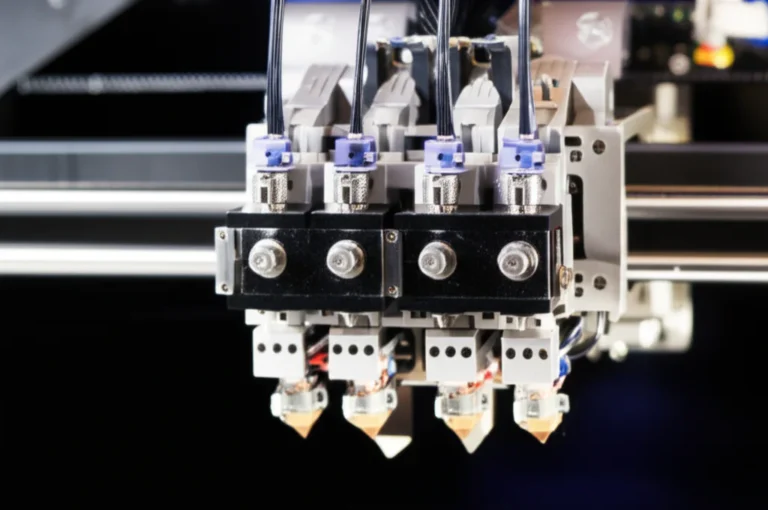
Dual and multi-extruder setups allow for the use of multiple filaments and colors in a single print. This method is ideal for creating objects with complex color schemes.
1.2 Single Nozzle Color Mixing and Palette Systems
Single nozzle color mixing and palette systems use a single extruder to mix and blend colors during printing. This method is ideal for creating objects with gradient effects. For more information on FDM multi-color techniques, check out the all3dp guide to multi-color 3D printing.
2. PolyJet and MultiJet Printing: High-Resolution Color Blending
PolyJet and MultiJet printing are methods that use photopolymer resins to create high-resolution, full-color objects. These methods are ideal for creating objects with intricate details and complex color schemes. According to Formlabs, their Color Resin is available in a wide range of hues, including custom colors.
3. Binder Jetting with Color Inks: Full-Color Sandstone and Beyond
Binder Jetting is a method that uses color inks to create full-color objects. This method is ideal for creating objects with high-resolution details and complex color schemes. For more information on Binder Jetting, check out the Stratasys guide to PolyJet technology.
4. SLA and DLP Multi-Color Innovations: Challenges and Solutions
SLA and DLP are methods that use laser or projector technology to create high-resolution, multi-color objects. These methods are ideal for creating objects with intricate details and complex color schemes. According to all3dp, SLA and DLP multi-color innovations are still evolving, with new technologies and techniques being developed.
5. Powder Bed Fusion and Color: Emerging Techniques and Limitations
Powder Bed Fusion is a method that uses powdered materials to create objects. This method is still emerging, with new techniques and limitations being discovered. For more information on Powder Bed Fusion, check out the 3D Printing Industry guide to powder bed fusion.
Materials for Multi-Color 3D Printing: Filaments, Resins, Powders, and Inks
The choice of material is crucial for multi-color 3D printing. Here are some common materials used:
- Filaments: Available in a wide range of colors, filaments are ideal for FDM multi-color printing.
- Resins: Available in a wide range of colors, resins are ideal for SLA and DLP multi-color printing.
- Powders: Available in a limited range of colors, powders are ideal for Powder Bed Fusion multi-color printing.
- Inks: Available in a wide range of colors, inks are ideal for Binder Jetting multi-color printing. For more information on materials, check out our 3D Printable Objects category.
Essential Hardware and Software for Multi-Color 3D Printing Success
To achieve success in multi-color 3D printing, you’ll need the right hardware and software. Here are some essentials:
- 3D Printer: A multi-color 3D printer is essential for creating objects with multiple colors.
- Slicing Software: Slicing software is necessary for preparing your 3D model for printing.
- Color Management Software: Color management software is necessary for managing colors and creating color profiles. For more information on hardware and software, check out our 3D Printer Reviews category.
Pro Tips and Tricks to Master Multi-Color 3D Printing
Here are some pro tips and tricks to help you master multi-color 3D printing:
- Use high-quality materials: High-quality materials are essential for achieving vibrant colors and detailed prints.
- Calibrate your printer: Calibrating your printer is necessary for ensuring accurate color reproduction.
- Use color management software: Color management software is necessary for managing colors and creating color profiles. For more information on tips and tricks, check out our 3D Design Software category.
Typical Applications of Multi-Color 3D Printing: From Prototypes to Art
Multi-color 3D printing has a wide range of applications, from prototyping to art. Here are some typical applications:
- Prototyping: Multi-color 3D printing is ideal for creating prototypes with complex color schemes.
- Model making: Multi-color 3D printing is ideal for creating models with intricate details and complex color schemes.
- Art: Multi-color 3D printing is ideal for creating artistic objects with vibrant colors and detailed textures. For more information on applications, check out our 3D Printable Objects category.
Customer Case Studies: Real-World Multi-Color 3D Printing Wins
Here are some customer case studies that demonstrate the power of multi-color 3D printing:
- Product design: A company used multi-color 3D printing to create a prototype of a new product with a complex color scheme.
- Model making: An artist used multi-color 3D printing to create a model of a building with intricate details and complex color schemes.
- Art: A designer used multi-color 3D printing to create an artistic object with vibrant colors and detailed textures. For more information on customer case studies, check out our 3D Printer Reviews category.
Troubleshooting Common Multi-Color 3D Printing Issues
Here are some common issues that can occur in multi-color 3D printing, along with some troubleshooting tips:
- Color inconsistency: Check your color profiles and calibration to ensure accurate color reproduction.
- Layer shifting: Check your printer’s alignment and calibration to ensure accurate layer alignment.
- Clogging: Check your printer’s maintenance and cleaning schedule to ensure proper maintenance. For more information on troubleshooting, check out our 3D Design Software category.
Future Trends and Innovations in Multi-Color 3D Printing
The future of multi-color 3D printing is exciting, with new technologies and innovations emerging. Here are some future trends and innovations to watch:
- Advances in materials: New materials with improved color accuracy and durability are being developed.
- Improvements in printer technology: New printer technologies with improved color reproduction and accuracy are being developed.
- Increased adoption: Multi-color 3D printing is becoming more widely adopted in various industries, from product design to art. For more information on future trends and innovations, check out our 3D Printable Objects category.
Recommended Links for Deep Diving into Multi-Color 3D Printing
Here are some recommended links for deep diving into multi-color 3D printing:
- Formlabs guide to color 3D printing
- all3dp guide to multi-color 3D printing
- Stratasys guide to PolyJet technology For more information, check out our 3D Printer Reviews category.
Frequently Asked Questions About Multi-Color 3D Printing
Here are some frequently asked questions about multi-color 3D printing, along with some answers:
- What is multi-color 3D printing?: Multi-color 3D printing is a technology that allows for the creation of objects with multiple colors in a single print process.
- What are the benefits of multi-color 3D printing?: The benefits of multi-color 3D printing include increased color accuracy, detailed textures, and complex color schemes.
- What are the limitations of multi-color 3D printing?: The limitations of multi-color 3D printing include high cost, complexity, and limited material availability. For more information, check out our 3D Design Software category.
Reference Links and Resources
Here are some reference links and resources for further learning:
- 3D Printing Industry
- 3D Printer Reviews
- 3D Design Software For more information, check out our 3D Printable Objects category.
Conclusion: Wrapping Up the Rainbow of Multi-Color 3D Printing

Multi-color 3D printing is no longer a futuristic dream—it’s a vibrant reality that’s transforming prototyping, product design, and artistic expression. From FDM’s accessible dual-extruder setups to PolyJet’s jaw-dropping color fidelity (hello, Stratasys J55™ Prime!), each method brings unique strengths to the table. We’ve seen how Palette systems cleverly mix filaments for smooth gradients, while binder jetting and material jetting push the boundaries of full-color realism.
But here’s the kicker: no one-size-fits-all solution exists. Your choice hinges on your budget, desired color accuracy, material needs, and technical skill. For example, the Stratasys J55™ Prime dazzles with over 640,000 color combinations and multi-material capability, perfect for professionals craving detail and speed. However, it comes with a premium price and complexity that might overwhelm hobbyists.
On the flip side, FDM multi-color printing with dual extruders or Palette offers a more affordable, hands-on experience, though with compromises in color blending and surface finish. SLA and DLP methods provide smooth surfaces and color matching but are still evolving in multi-color applications.
So, what’s our expert verdict? If you want top-tier color accuracy and multi-material versatility, the Stratasys J55™ Prime is a stellar choice for professional environments. For makers and beginners, start with dual-extruder FDM printers or explore Palette systems to dip your toes into multi-color waters without breaking the bank.
Remember those lingering questions about how to master color blending or which software to trust? We’ve unpacked those in the FAQ below—so keep reading to become a multi-color maestro! 🎨✨
Recommended Links for Multi-Color 3D Printing Gear & Resources
-
Stratasys J55™ Prime PolyJet 3D Printer:
Stratasys Official Website | Search on Thingiverse -
Mosaic Manufacturing Palette Multi-Material System:
Mosaic Official Website | Search on Thingiverse -
Ultimaker S5 (Dual Extruder FDM Printer):
Ultimaker Official Website | Search on Thingiverse -
Prusa i3 MK3S Multi-Material Upgrade:
Prusa Official Website | Search on Thingiverse -
Formlabs Color Resin for SLA Printing:
Formlabs Official Website | Search on Thingiverse -
Recommended Books on Multi-Color 3D Printing:
Frequently Asked Questions About Multi-Color 3D Printing
How to choose the right filament types for multi-color 3D printing projects?
Choosing the right filament depends on your printer’s compatibility and project requirements. For multi-color FDM printing, PLA is the most user-friendly due to its low warping and wide color availability. PETG and ABS offer more durability but require careful temperature control to avoid warping and color bleeding. Specialty filaments like silk PLA or wood-infused PLA add texture but may complicate color consistency. Always verify that your multi-extruder or filament mixing system supports the filament types you plan to use.
What are the challenges of multi-color 3D printing and how to overcome them?
Multi-color 3D printing can be tricky due to:
- Color bleeding and mixing issues: Use high-quality filaments and calibrate extrusion temperatures precisely.
- Complex printer calibration: Regularly align nozzles and check for mechanical wear.
- Increased print time and material waste: Optimize your slicing settings and consider software that minimizes purge blocks or filament swaps.
- Software limitations: Use slicing software with robust multi-material support like PrusaSlicer, Simplify3D, or Cura with multi-extruder profiles. Patience and incremental testing are your best friends here!
Can multi-color 3D printing improve the quality of prototypes?
✅ Absolutely! Multi-color printing enhances visual realism, helping stakeholders better understand product aesthetics and function. It can also highlight different parts or materials in a prototype, improving communication and reducing costly revisions. However, note that color fidelity depends on the printing technology—PolyJet and binder jetting offer superior color accuracy compared to FDM.
What software is recommended for designing multi-color 3D prints?
For designing multi-color prints, you need software that supports multi-material assignment and color mapping:
- Autodesk Fusion 360: Great for engineering parts with color layers.
- Blender: Excellent for artistic and complex color textures.
- Meshmixer: Useful for quick color assignments and repairs.
- PrusaSlicer and Cura: Popular slicers with multi-extruder support. For professional color management, consider GrabCAD Print (for Stratasys printers) or Materialise Magics.
Which 3D printers support multi-color printing out of the box?
- Stratasys J55™ Prime: Industry-leading PolyJet printer with full-color and multi-material capability.
- Ultimaker S5: Dual-extruder FDM printer with excellent multi-material support.
- Prusa i3 MK3S with MMU2S upgrade: Affordable multi-material FDM solution.
- da Vinci Color by XYZprinting: FDM printer with integrated inkjet color mixing.
- Formlabs Form 3 + Color Resin: SLA printer supporting color resins (limited hues). Each printer targets different user needs—from hobbyists to professionals.
How does multi-material 3D printing differ from multi-color 3D printing?
Multi-material printing involves printing with different materials (e.g., flexible and rigid filaments) to achieve varied mechanical properties, while multi-color printing focuses on varying colors, often within the same material type. Some printers, like the Stratasys J55™ Prime, combine both, enabling multi-material and multi-color prints simultaneously for tactile and visual complexity.
What are the best multi-color 3D printing techniques for beginners?
For beginners, we recommend:
- Dual-extruder FDM printers: Simple setup, affordable, and widely supported.
- Palette systems: Add-on devices that allow multi-color printing on single-extruder printers.
- Manual filament swaps: Pausing prints to change filament colors layer-by-layer. These methods balance ease of use with satisfying color results without overwhelming complexity.
How does multi-color 3D printing improve the final product quality?
Multi-color printing adds visual differentiation, realism, and functional clarity to parts. It reduces the need for post-print painting or assembly, saving time and cost. For example, medical models with color-coded anatomy or product prototypes with color-coded components improve communication and usability.
What materials are commonly used in multi-color 3D printing?
- PLA and ABS filaments for FDM.
- Photopolymer resins for PolyJet and SLA.
- Color inks in binder jetting.
- Powders for selective color fusion (still emerging). Material choice depends on printer compatibility and desired finish.
How do dual-extruder 3D printers work for multi-color printing?
Dual-extruder printers have two separate nozzles, each loaded with a different filament color. The printer switches between extruders during printing to deposit different colors on the same layer or in different layers. Calibration is key to avoid nozzle collisions and color bleeding.
Can multi-color 3D printing be used for functional prototypes or just decorative items?
✅ Multi-color 3D printing is excellent for both functional prototypes and decorative items. Color can indicate different materials, mechanical properties, or assembly parts in functional prototypes. Decorative items benefit from vibrant, complex color schemes without additional finishing.
Reference Links and Resources
- Stratasys J55™ Prime Official Page
- Mosaic Manufacturing Palette System
- Ultimaker S5 Official Website
- Prusa Multi-Material Upgrade
- Formlabs Color Resin
- Formlabs Guide to Color 3D Printers
- All3DP Multi-Color 3D Printing Methods
- 3D Printing Industry: Powder Bed Fusion Explained
These resources will help you verify facts, explore technologies, and find the best tools for your multi-color 3D printing journey. Happy printing! 🎉